What Is an RSS Feed? How It Works, Benefits & Examples
An RSS feed is a web format that allows users to receive updates from websites without visiting each website individually. RSS stands for Really Simple Syndication. It is commonly used by blogs, news websites, podcasts, and other online publishers to distribute newly published content automatically.
With an RSS feed, you can follow multiple websites from one place and see their latest articles, headlines, summaries, or podcast episodes in an RSS reader. Instead of repeatedly checking your favorite websites for new content, you can let an RSS reader collect updates for you.
RSS remains a useful tool for readers, researchers, content creators, and anyone who wants a more organized way to keep up with online information.
What Does RSS Stand For?
RSS stands for Really Simple Syndication. It is a standardized format for distributing frequently updated web content.
An RSS feed is usually an XML file containing information about published content. Depending on the website, it may include article titles, links, publication dates, descriptions, authors, and other metadata.
When a website publishes a new article, its RSS feed can be updated with the latest information. An RSS reader checks that feed and displays the new content to its subscribers.
For example, a news website might have an RSS feed containing its latest headlines. By subscribing to the feed, you can see those headlines in your reader without opening the news website every time.
How Does an RSS Feed Work?
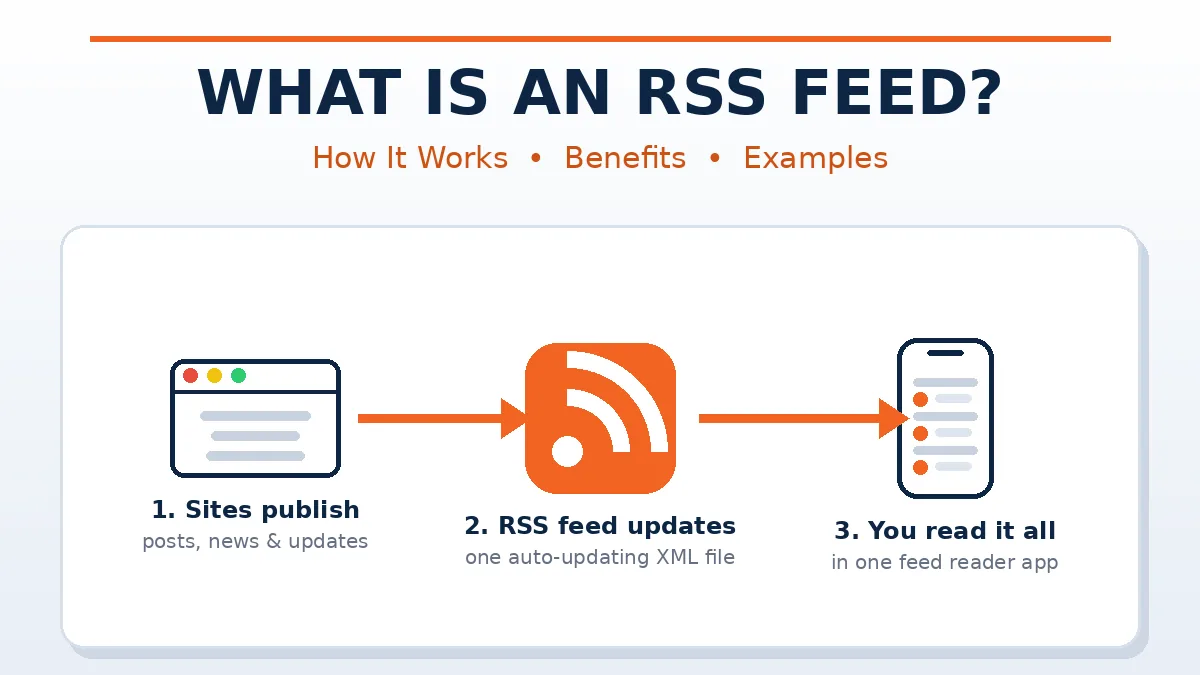
An RSS feed works by connecting a website’s published content to an application or service that can read RSS data.
The process is straightforward:
- A website publishes content: A blog, news website, or publisher releases a new article or update.
- The RSS feed is updated: The website’s feed provides information about the latest content.
- An RSS reader checks the feed: The reader periodically checks the feed for new items.
- Updates appear in the reader: New headlines and article links become available in one organized interface.
- You open the content: You can read the available summary or click through to the original website.
Some RSS readers check feeds automatically, while others let users refresh them manually. The exact behavior depends on the reader and the publisher’s feed.
What Does an RSS Feed Look Like?
An RSS feed is generally structured using XML, a markup format designed to organize data.
A simplified RSS feed might look like this:
<?xml version="1.0" encoding="UTF-8"?>
<rss version="2.0">
  <channel>
    <title>Example News Website</title>
    <link>https://example.com/</link>
    <description>Latest news and articles</description>

    <item>
      <title>How Technology Is Changing Daily Life</title>
      <link>https://example.com/technology</link>
      <description>A look at recent technology trends.</description>
      <pubDate>Wed, 21 Oct 2026 08:00:00 GMT</pubDate>
    </item>
  </channel>
</rss>
This example illustrates the basic structure of an RSS 2.0 feed. The channel describes the website or feed, while each item represents an individual piece of content.
The example is for educational purposes; it is not a live feed from an actual news publisher.
How to Find an RSS Feed on a Website
Finding an RSS feed is often easy, although the method varies from one website to another.
1. Check the Website
Look for an RSS icon or a link labeled RSS, Feed, or Subscribe. These links are sometimes available in the website’s footer, blog section, or subscription area.
2. Try Common Feed URLs
Some websites use standard feed addresses. You can try opening these paths after the website’s domain:
/feed//rss//feed.xml/rss.xml
These are common possibilities, not universal addresses. A website may use a different URL or may not provide a public RSS feed at all.
3. Check the Page Source
Some websites identify their feeds in the HTML source code through a link element with an RSS or Atom content type. If you are comfortable inspecting page source, searching for application/rss+xml can help you find the feed URL.
4. Look for a Publisher’s Subscription Information
News publishers and blogs sometimes provide their feed URLs on dedicated help, contact, or subscription pages.
How to Subscribe to an RSS Feed
To subscribe to an RSS feed, you generally need an RSS reader.
Follow these steps:
- Choose an RSS reader that suits your device and preferences.
- Find the RSS feed URL of the website you want to follow.
- Copy the feed URL.
- Open your RSS reader and select its add-feed or subscribe option.
- Paste the URL and confirm the subscription.
- Repeat the process for other websites you want to follow.
Once subscribed, you can usually organize feeds into folders, mark articles as read, save interesting posts, and search previously collected content. Available features depend on the application you use.
What Is an RSS Reader?
An RSS reader is an application or online service that collects and displays updates from RSS feeds.
Instead of visiting several websites individually, you can use a reader to view their latest content in one place.
RSS readers commonly offer features such as:
- A combined list of new articles
- Feed categories and folders
- Read and unread status
- Saved articles
- Search and filtering tools
- Synchronization across supported devices
Some readers are available through web browsers, while others provide desktop or mobile applications. Many offer free options, although certain features may require a subscription.
What Are the Benefits of Using RSS Feeds?
RSS feeds offer several advantages for people who regularly consume online content.
Saves Time
You can monitor multiple websites from a single reader instead of opening each website separately to check for updates.
Helps You Follow Trusted Sources
RSS allows you to choose the publishers you want to follow. This can help you focus on selected sources rather than relying entirely on social media recommendations.
Reduces Dependence on Social Media
You can receive updates directly from the websites you subscribe to, without depending on a social platform’s recommendation algorithm.
Supports Research and Monitoring
Students, researchers, journalists, and content creators can use RSS to track new articles, industry developments, and updates from selected publications.
Keeps Content Organized
Many readers allow you to group feeds by topic, such as technology, business, education, science, or entertainment.
What Are the Limitations of RSS Feeds?
Although RSS is useful, it has some limitations.
- Not every website offers RSS: Some publishers do not provide public feeds.
- Feed content may be limited: A feed may contain only a headline and short summary rather than the full article.
- Updates may not appear instantly: Readers generally check feeds periodically, so there can be a delay.
- Feeds can stop working: Website redesigns, server problems, or changes to feed URLs may interrupt subscriptions.
- Some content is not supported through RSS alone: Interactive pages, personalized content, and certain multimedia experiences may require visiting the original website.
RSS is therefore best viewed as a convenient content-discovery tool rather than a complete replacement for browsing websites.
What Is the Difference Between RSS and Email Newsletters?
RSS feeds and email newsletters both help users keep up with new content, but they work differently.
| Feature | RSS Feed | Email Newsletter |
|---|---|---|
| Delivery method | RSS reader | Email inbox |
| Subscription | Add a feed URL or use a subscribe option | Submit an email address |
| Content organization | Managed inside an RSS reader | Managed inside an email service |
| Multiple sources | Feeds can be combined in one reader | Newsletters arrive as separate emails |
| Unsubscribe | Remove the feed from your reader | Unsubscribe through the newsletter service |
| Availability | Requires a supported feed | Requires the publisher to offer a newsletter |
RSS is often convenient for following many publishers, while email newsletters can be useful for curated updates, exclusive content, and messages delivered directly to your inbox.
Are RSS Feeds Still Used Today?
Yes, RSS feeds are still used by blogs, news publishers, podcasts, and other websites that distribute regularly updated content.
They are particularly useful for people who want to monitor several sources without relying exclusively on social media. Podcast applications may also use RSS-based feeds to retrieve episode information and media links.
RSS is an established web technology, and its simple, standardized structure makes it useful for both individual readers and automated content-monitoring systems.
Frequently Asked Questions About RSS Feeds
Is an RSS feed free to use?
RSS itself is a free, open web technology. Some RSS readers offer free plans, while others charge for advanced features.
Do I need an account to use an RSS feed?
Not always. Some readers allow you to add feeds without creating an account, while online services may require registration to synchronize subscriptions across devices.
Can I use RSS feeds on my phone?
Yes. Many RSS readers support smartphones through mobile applications or web interfaces.
Can an RSS feed contain the full article?
Yes, if the publisher chooses to include the full article. Other feeds provide only a headline, excerpt, or summary.
Is RSS the same as Atom?
No. RSS and Atom are separate syndication formats. Both can distribute updates from websites, but their technical structures differ.
Can I create an RSS feed for my website?
Yes. If your publishing platform does not generate a feed automatically, you can create one using an RSS-generation tool or custom code. WordPress websites commonly provide feeds by default, although plugins and configuration settings can affect their availability.
Conclusion
An RSS feed is a simple way to receive updates from websites in one convenient location. By using an RSS reader, you can follow blogs, news sources, podcasts, and other publishers without repeatedly visiting their websites.
Although RSS does not replace every online subscription or browsing experience, it remains a practical option for organizing information, monitoring trusted sources, and discovering newly published content.
For more useful guides, technology explanations, and informative articles, visit Uploadinsider.